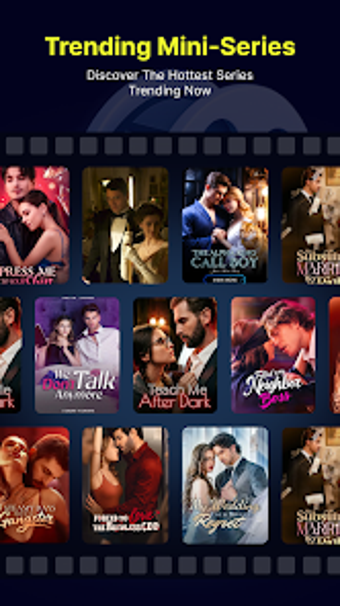
Vertical mini-drama app for quick, one-handed viewing sessions
Plays bite-sized vertical-screen mini-series with one-handed swipe navigation, designed for short breaks and commutes. NovelDrama, from Mushtaq Trading Company, targets mobile viewers who prefer short-form episodic drama. The app delivers HD playback, personalized recommendations via a Discover tab, and real-time commenting so fans can react as episodes roll by. It fits viewers who favor quick narrative hits and social interaction over long-form binge sessions.
How the app fits quick viewing routines
The app organizes episodes into short, vertical-format series engineered for brief sessions, which matches the stated focus on bite-sized entertainment. Episodes are a few minutes long and formatted for one-handed mobile viewing, so you can open the app between meetings or on transit and watch a complete installment without a large time commitment. The Discover tab suggests what to watch next based on viewing habits, keeping sessions focused.
How it handles playback quality and controls
The app offers HD streaming and interactive playback controls that let you change speed, clear the screen, and save favorites with a single tap, so playback adapts to different listening or viewing situations. Smooth, HD full-screen video and clear sound support a cinematic feel on a phone. Playback responsiveness matters for short episodes, and the app's controls are tuned for quick adjustments while on the move.
How it supports social interaction and community viewing
The app includes real-time commenting and sharing features that let viewers react as episodes play, which creates a synchronous feel among fans. Community engagement is built into the viewing flow, so discussions appear alongside episodes rather than in a separate forum. That design makes the app useful for viewers who want immediate reactions and brief social exchanges tied to each installment.
How content variety and updates affect daily use
The library focuses on popular tropes such as romance, CEO stories, and thrillers, which concentrates the catalogue around trending mini-drama themes. New episodes and series are added frequently, so the feed refreshes often and keeps daily sessions from going stale. The emphasis on vertical-native production means each new title is shot and formatted for phone screens rather than repurposed horizontal content.
To sum up, a strong fit for short-session drama fans
NovelDrama suits viewers who want quick, socially active drama on Android devices and prefer vertical, mobile-native episodes. Expect frequent new installments and an emphasis on popular storytelling tropes; if you watch long-form series or need cross-platform access, the app may not meet that need. Pro tip: use the Discover tab and save favorites to build a short, ready-to-watch queue before short commutes.